How to Play Super Bear Adventure Online?
You can play Super Bear Adventure on Android, iOS, or Nintendo Switch, and on a computer through a free Android emulator like BlueStacks, since there is no official browser version of the game. In this guide, we will walk through every real way to play, step by step, using easy language so you can get started right away, whether you want to play on your phone, your PC, or online together with friends.
Is there an official browser version of Super Bear Adventure?
No, there is currently no official version of Super Bear Adventure that runs directly in a web browser. The game was built as a mobile and console title, so Earthkwak Games, the developer, has focused on Android, iOS, and Nintendo Switch instead of a browser release. If you come across a website claiming to offer a browser version, treat it carefully, since it is not an official product from the real developer.
How do you play Super Bear Adventure on PC?
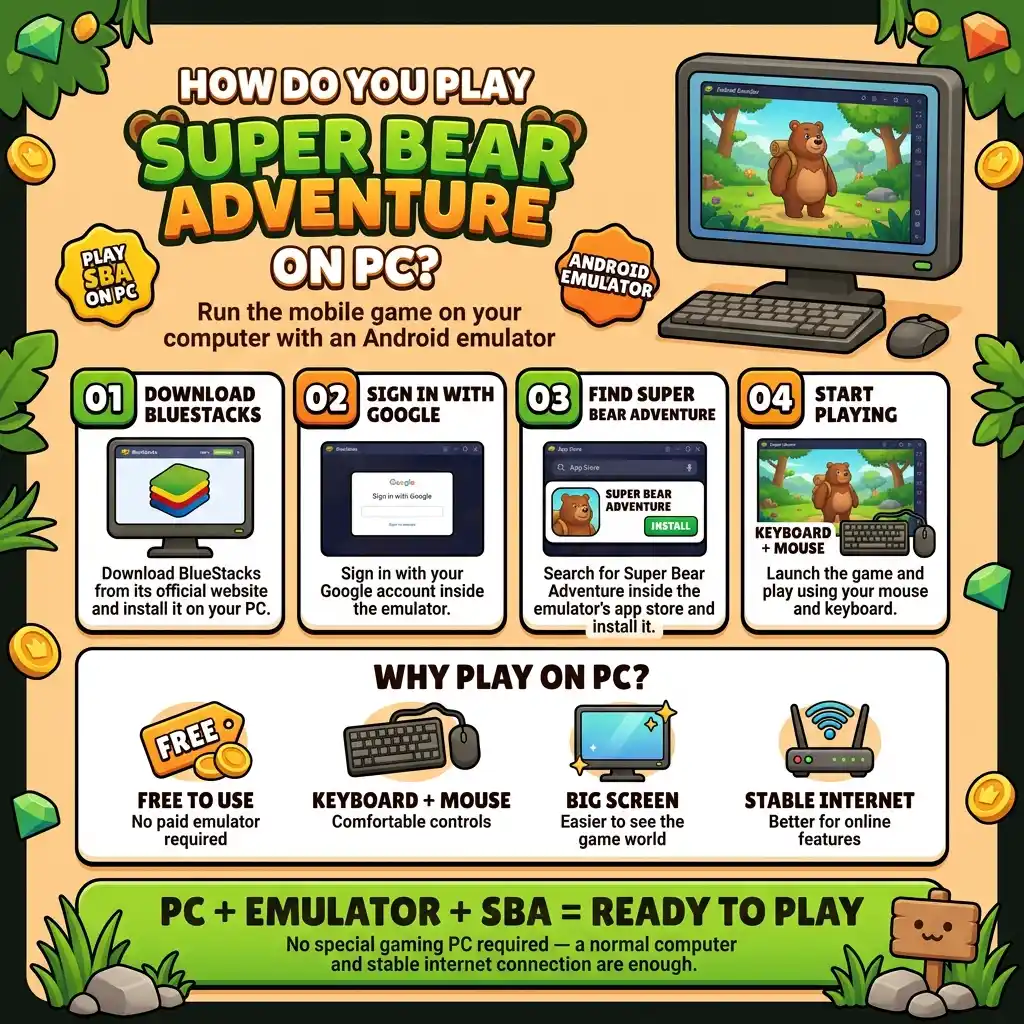
You can play Super Bear Adventure on PC by using an Android emulator, which is a free program that lets your computer run mobile apps. The most common choice is BlueStacks, a tool that many players use for mobile games. To get started, you download BlueStacks from its official website, install it on your PC, then sign in with a Google account and search for Super Bear Adventure inside the emulator’s own app store, just like you would on a phone.
Once the game is installed, you can play using your mouse and keyboard, which some players find more comfortable than touch controls. This method is completely free and does not require anything beyond a normal computer with a stable internet connection.
What do you need to run Super Bear Adventure on an emulator?
You need a computer with at least 4GB of RAM, around 10GB of free storage space, and administrator access on your device to install and run an emulator smoothly. Both Windows 7 or later and macOS 11 or later are generally supported, along with Intel, AMD, or Apple Silicon processors. If your computer meets these basic requirements, the game should run without major issues through an emulator like BlueStacks.
Can you play Super Bear Adventure on Mac?
Yes, you can play Super Bear Adventure on a Mac using the same emulator method used on Windows computers. BlueStacks and similar Android emulators support macOS 11 (Big Sur) and later, so Mac users are not left out of the PC experience. The setup process is nearly identical: download the emulator, install it, sign in with Google, and search for the game inside the app store built into the emulator.
How do you play Super Bear Adventure with friends online?
You play with friends online by using the game’s built-in multiplayer mode, which lets you explore the kingdom together in real time rather than alone. After opening multiplayer mode from the main menu, you can either join a shared world with other players or use an invite code to bring specific friends into your own game session. This turns the usually solo adventure into a shared experience, complete with emotes so you can communicate without needing a separate chat app.
Is it safe to play Super Bear Adventure online through an emulator?
Yes, it is generally safe as long as you download your emulator directly from its official website, such as the real BlueStacks site, rather than from an unknown third-party link. Official emulators are widely used by millions of players and do not contain hidden malware when downloaded from the correct source. As with any app, avoid pirated versions or modified files claiming to unlock extra content, since these are the main source of real safety risks.
What devices officially support Super Bear Adventure?
The game officially supports Android phones and tablets, iPhones and iPads, and the Nintendo Switch, with the Android version also playable on PC or Mac through an emulator. There is no official version for Xbox, PlayStation, or a standalone web browser at this time. If you want the most authentic experience with the smoothest performance, playing directly on a supported mobile device or Nintendo Switch is usually the best option.
Do you need an internet connection to play Super Bear Adventure?
You do not need an internet connection for the core single-player story, since most exploration and missions can be played offline once the game is installed. However, an internet connection is required if you want to use multiplayer mode, download new updates, or access certain online features tied to your account. If you are planning a long trip without internet access, the solo adventure will still work fine.
Can you play Super Bear Adventure online without downloading the app?
No, there is currently no way to play Super Bear Adventure instantly through a link without installing something first, whether that is the official mobile app or an emulator on your computer. Some third-party websites advertise instant browser play for popular mobile games, but these are not connected to the real developer and often lead to ads, broken links, or unsafe downloads instead of an actual working game. The only reliable path to playing online is through the official Google Play Store, Apple App Store, Nintendo eShop, or a trusted emulator like BlueStacks.
What is the difference between playing solo and playing online?
Playing solo means exploring the kingdom by yourself at your own pace, working through the main story, freeing bears, and collecting secrets without anyone else in your world. Playing online through multiplayer mode adds other real players into the same shared space, letting you explore together, use emotes to communicate, and enjoy extra content like the bonus levels that were built specifically for online play.
Both ways of playing use the same core game, so you can switch between solo exploration and online sessions whenever you like, depending on whether you want a quiet adventure or a more social one.
How much storage space do you need to play online?
You generally need a few hundred megabytes of free storage on mobile, and around 10GB of free space if you are installing an emulator on PC, since the emulator software itself takes up far more room than the mobile app alone. Keeping some extra storage free beyond the minimum requirement is a good idea, since future updates tend to add new regions, features, and files that slowly increase the total install size over time. Checking your device’s available storage before starting a large download helps avoid a failed or interrupted installation partway through.
Frequently Asked Questions
Can I play Super Bear Adventure online for free?
Yes. Super Bear Adventure is free to download on Android, iOS, and through PC emulators like BlueStacks. The game includes optional in-app purchases and ads, but there is no cost required to start playing.
Do I need to download anything to play Super Bear Adventure online?
Yes, you need to download either the official mobile app from the Google Play Store or Apple App Store, or an emulator like BlueStacks if you want to play on a computer. There is no way to play instantly in a browser without downloading anything.
Can two people play Super Bear Adventure together on the same account?
No, each player needs their own device and their own save file to join a shared multiplayer session. The game’s multiplayer mode is designed for separate players connecting over the internet, not for sharing a single account at the same time.
Is Super Bear Adventure cross-platform?
The multiplayer mode is designed to let players connect online regardless of whether they are on Android or iOS, though full cross-platform support with Nintendo Switch may vary depending on the current version. Checking the official update notes is the best way to confirm the latest multiplayer compatibility.
What is the safest way to play Super Bear Adventure on a computer?
The safest way is to download the official BlueStacks emulator directly from its real website, then install Super Bear Adventure through the built-in Google Play Store inside the emulator, exactly as you would on a phone.
Final Thoughts
There is no shortcut browser link that lets you play Super Bear Adventure without downloading anything, but between the official mobile apps, Nintendo Switch, and free PC emulators like BlueStacks, almost everyone can find a way to play.
If you want the social side of the game, jumping into multiplayer mode with friends is the easiest way to turn this relaxing solo adventure into a shared online experience, no matter which device you happen to be playing from. Whichever method you choose, sticking to official app stores and trusted emulator downloads is the simplest way to make sure your first session goes smoothly.